[?] Subscribe To This Site

XML RSS
Add to Google
Add to My Yahoo!
Add to My MSN
Subscribe with Bloglines

Home
Learn How To Play
What's New?
Reviews
How to Choose
PSR Keyboards
Shop Here
Questions & Answers
Digital Pianos
Portable Keyboards
Piano Keys Layout
User Reviews
Accessories
Yamaha Keyboards
Learn To Play Piano
Clavinovas
Key' Player Wanted
Yamaha Piano Videos
Other Brands
Other Brands 2
Free Newsletter
Yamaha Instruments
Articles
Keyboard Amplifiers
About/Contact
Privacy Policy

Yamaha YPG Keyboard Screen Display Problem!

by Mike H
(PA)
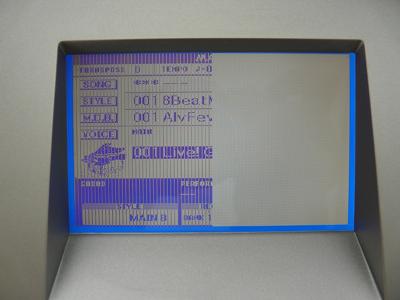
Yamaha YPG Display Problem Close
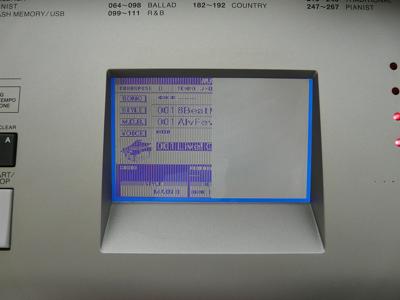
Yamaha YPG Display Problem Close

Yamaha YPG Display Problem Close Yamaha YPG Display Problem Far

I have a Yamaha YPG-625 Keyboard and I have only used it for maybe 12 hours (I unplug it when not in use) in the last 4 years I bought it(12/23/2006). Now the Screen Display only shows half (see attached pictures). How do I get this fixed or what is Yamaha's warranty?


Comments for
Yamaha YPG Keyboard Screen Display Problem!

Average Rating starstarstarstarstar

Click here to add your own comments

Dec 28, 2010
Rating
starstarstarstarstar
I fixed this now by Replacing the LCD
by: Mike H

I have a YPG-625. I suggest calling an authorized dealer is seeing how much they will charge you to replace you malfunctioning LCD with a new one. They get a bigger discount from Yamaha and it may actually be cheaper. If you want to do it yourself follow the below understanding I am not a qualified service tech just a do-it-yourselfer. There are a total of 114 screws (you will want to power screw driver fully charged) and 2 solder connections (you will need a soldering Iron and solder).

ALSO:

- DO NOT open the case unless you are aware of and comfortable with the fact that you could destroy your piano. You will need to solder 2 small connections (if you don't know how to solder go to youtube).

- Observe appropriate anti-static precautions. It should go without saying that this is an electronic repair, and dangerous voltages may exist inside the case.

Steps to Replace the LCD:

1. I ordered a new LCD from Yamaha. $169 + 25%discount if you call and ask + shipping.

2. Remove from the stand if you have one (4 screws).
3. Lay the keyboard upside down on it's face (put on cloth or towel so no scratches).
4. Remove ALL 102 screws from the bottom of the chassis, including the 14 inside the speaker compartments
5. Carefully lift up on the bottom part of the case just enough to remove the speaker wire connector so you can completely remove the bottom case. Take care not to damage the speaker lines
6. LCD is mounted beneath main logic board.
7. Remove ALL the ribbon cables (notice how they are oriented and where they go, you will need to replace these latter) except the main one (top right corner since flipped on face and you are looking from the Top of the piano).
8. Remove the 4 screws from the main board.
9. Carefully lay the motherboard over to the right.
10. Remove the 4 screws to the LCD.
11. Remove the Soldered power wires from the LCD. To do this, look at the connector on the board were this wire connects. The top part of this plastice white connector lifts up slightly (don't pull to hard) then you can easily pull the wire out).
12. Unsolder this wire from the old LCD. Make sure you notice which wire is + and which is connected to -.
13. Solder this wire onto the NEW LCD. Make sure you connect the correct wire to + and the other to -. (See YouTube to solder correctly if you don't know)
14. Plug the new LCD power wires back into the white power connector on the board.
15. Replace 4 LCD Screws.
16. Replace Motherboard and all ribbon cables.
17. Replace 4 motherboard screws.
18. Replace speaker wire connection
19. Replace all 102 screws
20. Replace 4 screws on stand.


Mar 13, 2012
Rating
starstarstarstarstar
DISPLAY PROBLEM NEW
by: Anonymous

I Want PSR 3000 Keyboard new display and how many cost.

Click here to add your own comments

Join in and write your own page! It's easy to do. How?
Simply click here to return to Yamaha YPG Keyboards Questions


Search This Site:

Custom Search


Recommended For You

Learn to play piano and keyboards:

Piano For All Piano Lessons

Click here to learn how to play keyboards and piano (with Piano For All).

rocket piano - learn to play keyboards and piano

Click here to learn to play piano and keyboard (with Rocket Piano).

Buy a keyboard:

Click here to buy a keyboard or other musical instrument.

Join the discussions in our Yamaha Keyboard Forums. Share your views and ask questions about Yamaha keyboards here.

Yamaha Keyboard Guide.com is on Facebook. Click the like button below and join us on Facebook.

Exclusive content. Subscribe to our FREE newsletter. Enter your E-mail Address

Enter your First Name (optional)

Then

Don't worry -- your e-mail address is totally secure.
I promise to use it only to send you Yamaha Keyboard Guide Xpress!.