Yamaha UX16 USB MIDI Interface - Connect Keyboard to Computer
Yamaha UX16 USB MIDI Interface
I often get this question here. "How do I connect my keyboard to my computer?" One way to connect your Yamaha keyboard or other MIDI instrument to your PC is with a UX16 USB-MIDI interface. It sells for about 40 bucks online. It's a very easy way of connecting any MIDI keyboard (it doesn't have to be a Yamaha keyboard) to your computer.
Highly Recommended: Go here for the BEST piano/keyboard course I’ve seen on the Internet.
You simply connect the Yamaha UX16 USB MIDI Interface to your USB port on your computer and plug the MIDI in and out cables into your keyboard. (Your computer must have a USB jack).
The UX16 has a MIDI cable that is just over 4 feet long and the USB cable is 2 feet. You have to install a driver (included with your Yamaha UX16 USB MIDI interface) on your computer for everything to work.
This is an excellent way of connecting any keyboard that comes with MIDI to your PC, Mac or laptop computer. This opens up a world of possibilities. You can transfer data back and forth between your keyboard and computer and use your keyboard as a MIDI controller for recording, sequencing or notation purposes. The UX16 can handle 16 channels of simultaneous playback.
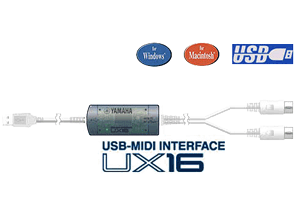
It works with both windows and macintosh. It's compatible with Windows 98/Me/2000/XP/Vista. For macintosh users, it works with Mac OS8.5 through OSX.
The UX16/96 driver for Windows 2000/XP/Vista can be downloaded athttp://www.yamahasynth.com/download/midi_driver.html You will also find drivers for Mac OS 8.6 - 9.2.2 and Mac OSX (Universal Binary).
So when you need to connect your Yamaha keyboard or any keyboard that comes with MIDI (most do) to your computer or laptop, PC or Mac, all you need is a Yamaha UX16. Having used this interface myself, I highly recommend it. I've had no issues with it and love it. Pretty simple to use.
Top of Yamaha UX16 USB MIDI interface.



Search This Site:

Recommended For You
Learn to play piano and keyboards:

Click here to learn how to play keyboards and piano (with Piano For All).
Go here to buy a Yamaha keyboard.
Check out How To Read Music Fast: A 4-Step Beginner's Guide To Reading Music Quickly And Easily.
New! Comments
Have your say about what you just read! Leave me a comment in the box below.