[?] Subscribe To This Site

XML RSS
Add to Google
Add to My Yahoo!
Add to My MSN
Subscribe with Bloglines

Home
Learn How To Play
What's New?
Reviews
How to Choose
PSR Keyboards
Shop Here
Questions & Answers
Digital Pianos
Portable Keyboards
Piano Keys Layout
User Reviews
Accessories
Yamaha Keyboards
Learn To Play Piano
Clavinovas
Key' Player Wanted
Yamaha Piano Videos
Other Brands
Other Brands 2
Free Newsletter
Yamaha Instruments
Articles
Keyboard Amplifiers
About/Contact
Privacy Policy

Display image distorted - Yamaha PSR900S

by Alun
(Papua New Guinea )
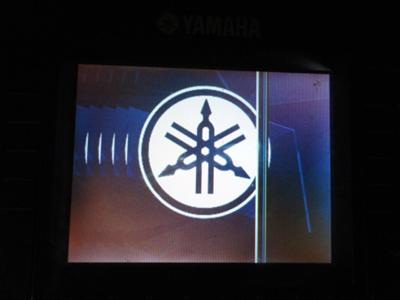
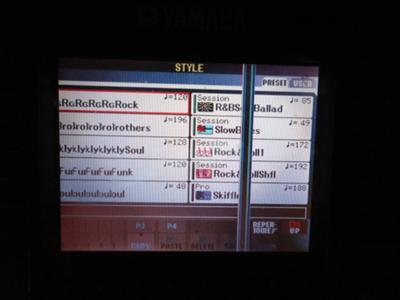
My PSR900S has developed a fault line through the middle of the display. All modes have the same image fault.
Any suggestions of how to fix it or which Board to replace?


Comments for
Display image distorted - Yamaha PSR900S

Average Rating starstarstarstarstar

Click here to add your own comments

Dec 19, 2011
Rating
starstarstarstarstar
Yamaha PSR S900 Screen Replacement
by: Anonymous

Problem fixed by myself. I researched this sites pages to find that the Yamaha PSR S900 has a chronic fault with the quality of the nomitor screen. The replacements supplied to others have also failed as they must be the same low quality as the original screen.

I decided that it is of no use to install the same type of Yamaha replacement screen which is hard to get any way here in PNG. I noted one owner has had 4 x screens fail already. Also I did not want to use a separate outside screen as it is hard to relate to which buttons to press.

Solution: I measured the KBD screen to be 12cm x 9cm. Then I went searching the local stores for a suitable replacement. I found a reasonable quality small, portable DVD player with a flip up screen and A/V input. The DVD screen measured slighty larger than the keyboard screen. I purchased it and connected it the the KBD video out. A quality image of the menu appeared and when measured I found the image would fit the KBD screen opening perfectly aligninf to all the button positions.

The next job was to dismantle the KBD which required removing the main circuit board and the faulty screen. I then diss-assembled the DVD player to separate out the screen from the casing along with the circuit & button boards relating to the control of the screen.

I found the DVD screen fitted in to the KBD perfectly and was then aligned clamped in place. The connected DVD boards were then placed in a clear area and hot glued to the KBD case. I soldered an A/V cable from behind the KBD yellow Video output and connected it directly to the mini A/V input on the DVD circuit board.

This left me with onlt two more items to finalise. The 12VDC required for the DVD Screen was patched through a socket that I mounted near the KBD P/S input. The final item was a the ability to press the DVD Menu button as the DVD screen naturally starts up on DVD Player. I drilled a small hole near the headphone socket and mounted the button and its small circuit board there.
That's it. Currently I have use the KBD Power Supply and a 12VDC Plug Pack to run the KBD screen. Then I press the DVD Menu buttom once and Bingo there is the KBD info in colour almost exactly as the original.

Fingers crossed that the screen will continue to function reliably. The only upgrade I will do in the future will be to tap into a 12VDC source from within the KBD 19VDC so that the KBD is completely self contained again.
Total cost was $100 and 2 hours work.


Click here to add your own comments

Join in and write your own page! It's easy to do. How?
Simply click here to return to Yamaha PSR Keyboard Questions 3


Search This Site:

Custom Search


Recommended For You

Learn to play piano and keyboards:

Piano For All Piano Lessons

Click here to learn how to play keyboards and piano (with Piano For All).

rocket piano - learn to play keyboards and piano

Click here to learn to play piano and keyboard (with Rocket Piano).

Buy a keyboard:

Click here to buy a keyboard or other musical instrument.

Join the discussions in our Yamaha Keyboard Forums. Share your views and ask questions about Yamaha keyboards here.

Yamaha Keyboard Guide.com is on Facebook. Click the like button below and join us on Facebook.

Exclusive content. Subscribe to our FREE newsletter. Enter your E-mail Address

Enter your First Name (optional)

Then

Don't worry -- your e-mail address is totally secure.
I promise to use it only to send you Yamaha Keyboard Guide Xpress!.